
How to Register on PK365 – Create Your Account Step by Step 📝
Creating a PK365 account is quick and free. Once you register, you can log in, set up your wallet, join the games, and collect new player rewards. This guide walks you through the real sign-up screen in simple steps, shows what each option means, and helps you fix the small problems people sometimes face.
What Is PK365 Registration? 🎯
Registration simply means making your own PK365 account so the app knows it is you. You only need to do this once. After you register, you use the same details to log in every time. The PK365 app lets you register with your phone number, email, or profile, and it takes just a minute or two.
What You Need Before You Start ✅
Before you begin, keep a few things ready: a working Pakistani mobile number (the app uses the +92 code) so you can receive the SMS code, a password you can remember, and a stable internet connection. You should also have the PK365 app installed, or be on the official website. That is all you need to sign up.
Where to Find the Register Option 📲
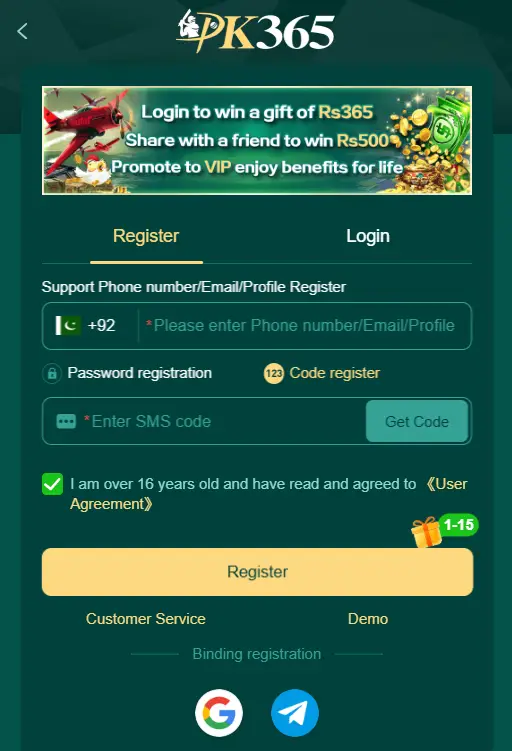
Open the PK365 app or website. On the opening screen you will see two tabs side by side: Register and Login. Tap the Register tab to open the sign-up form. You will also notice a small “1-15” gift badge next to the Register button – this points to the new player sign-up reward.
How to Register on PK365 – Step by Step 🔢
Follow these steps exactly as they appear on the screen:
- Open the app and tap the Register tab.
- In the top field, enter your details. The app supports Phone number, Email, or Profile registration. The phone field already shows +92 for Pakistan.
- Choose how you want to register: Password registration or Code register.
- If a code is needed, tap Get Code next to the SMS field, then type the code sent to your phone in the Enter SMS code box.
- If you chose password registration, set a strong password you can remember.
- Tick the box that says “I am over 16 years old and have read and agreed to the User Agreement.” You must accept this to continue.
- Tap the Register button.
- Once it goes through, you are taken into the app, where you can set up your wallet and start.
Quick Sign-Up With Google or Telegram 🔗
If you prefer, the Register screen also has a Binding registration option at the bottom with Google and Telegram icons. Tap one of these to register by linking that account instead of filling the form manually. Customer Service and a Demo option are also on the same screen if you need help or want to look around first.
What Happens After You Register? 🎁
After your account is created, you are signed in and can set up your details and wallet. New users are eligible for sign-up rewards shown in the Mission section, so it is worth checking the “New Player” tab once you are in. Set your account information carefully at this stage, because some details cannot be changed later, especially before your first withdrawal.
How to Log In After Registering 🔑
The next time you open the app, just tap the Login tab, enter the phone number or email you registered with, choose Password Login or Code Login, and tap Login. You can read the full login guide on our PK365 Login page.
Common Registration Problems and Fixes 🛠️
| Problem | What to Do |
|---|---|
| No SMS code received | Check your number is correct, wait a minute, then tap Get Code again. |
| Register button not working | Make sure you ticked the User Agreement box first. |
| Weak password error | Use a mix of letters and numbers for a stronger password. |
| Wrong number entered | Re-enter the correct number before requesting a new code. |
| Page not loading | Check your internet, or clear your browser cache and try again. |
Tips for a Safe Sign-Up 🔒
Always register on the official app or website, not on links sent by strangers. Keep your password private, set your account details correctly the first time, and use the Customer Service option on the screen if anything is unclear.
FAQ❓
Is PK365 registration free?
Yes. Creating a PK365 account does not cost anything.
Can I register with my email?
Yes. The app supports Phone number, Email, or Profile registration. You can also link a Google or Telegram account.
Do I need a referral code to register?
No. A referral code is not required. You can sign up without one.
Why do I need to enter an SMS code?
The SMS code confirms that the phone number is really yours, which helps keep your account secure.
Is there an age requirement?
Yes. The sign-up screen asks you to confirm you are over 16 and agree to the User Agreement before you can register.