
How to Add Funds to PK365 – Easypaisa, JazzCash & Crypto Guide 💰
Adding funds to your PK365 wallet is simple and fast. The app supports JazzCash and Easypaisa through Scan to Pay, as well as Crypto. This guide walks you through the real deposit screen so you know exactly what to tap, how much you can add, and what to do if something does not show up right away.
What Is a PK365 Deposit? 🎯
A deposit means adding funds to your in-app wallet so you can join the games. Your current balance is shown at the top of the deposit screen, and adding funds updates it. You need to be logged in first — if you do not have an account yet, see our PK365 Register guide.
Where to Find the Deposit Option 📲
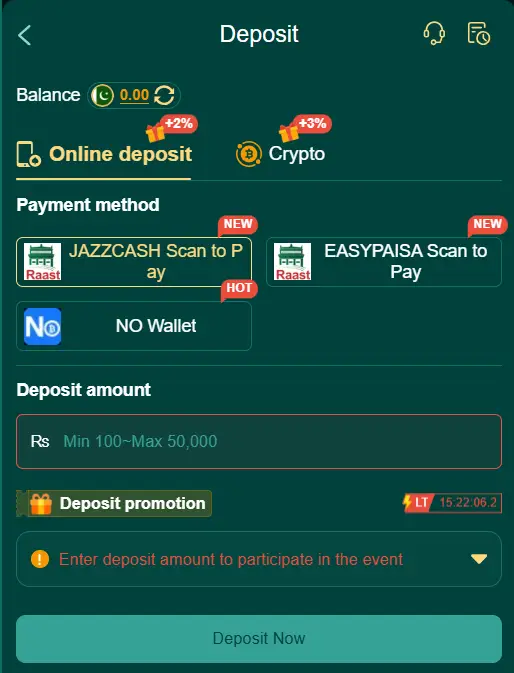
Log in, then open the wallet or deposit area. At the top of the Deposit screen you will see your Balance, plus a support icon and a history icon to review past transactions. The screen is split into two tabs: Online deposit and Crypto.
Payment Methods on PK365 💳
Based on the real deposit screen, PK365 offers these options:
| Payment Method | Type | Notes |
|---|---|---|
| JazzCash (Scan to Pay) | Online deposit | Shown with Raast |
| Easypaisa (Scan to Pay) | Online deposit | Shown with Raast |
| No Wallet | Online deposit | Alternative option |
| Crypto | Crypto tab | For users who prefer it |
The Online deposit tab shows a small bonus badge (+2%) and the Crypto tab shows (+3%), so the method you pick can affect your deposit bonus. Always check the live screen for the current offer.
Easypaisa (Scan to Pay) 📲
Easypaisa is one of the most trusted payment services in Pakistan. On PK365 it appears as EASYPAISA Scan to Pay. You pay by scanning, then confirm from your own Easypaisa account. Keep your PIN private and only approve a payment you started yourself.
JazzCash (Scan to Pay) 📱
JazzCash works the same way, shown as JAZZCASH Scan to Pay. Choose it, follow the Scan to Pay steps, and confirm from your JazzCash account. Double-check everything before you confirm.
Deposit Limits 📊
The deposit screen clearly shows the amount range: Minimum Rs 100 and Maximum Rs 50,000 per deposit. Enter any amount within this range.
What to Check Before You Deposit ✅
Make sure you are logged in, your own Easypaisa or JazzCash account has enough balance, and you are inside the official app. If a Deposit promotion is running, it shows with a countdown timer – enter your amount to see if you qualify before it ends.
How to Deposit Step by Step 🔢
- Log in and open the Deposit screen.
- Choose a tab: Online deposit or Crypto.
- Under Payment method, tap your choice — JazzCash Scan to Pay, Easypaisa Scan to Pay, No Wallet, or Crypto.
- In the Deposit amount field, enter an amount between Rs 100 and Rs 50,000.
- Check the Deposit promotion box if an offer is active.
- Tap Deposit Now.
- Complete the Scan to Pay / payment step from your wallet app.
- Your balance updates. Tap the refresh icon next to Balance if it does not show right away.
How to Check Your Deposit Status 🕒
Use the history icon at the top of the deposit screen to see your recent transactions and their status. If your balance has not updated, tap the refresh icon first.
If Your Deposit Is Pending or Missing ⚠️
The app’s own Help Center covers this exact situation. If your payment was successful but the balance has not been credited, first check your transaction records, then wait at least 15 minutes, and if it still has not shown, contact customer service with your transaction ID, time, amount, and proof of payment (such as the SMS confirmation).
Common Deposit Problems and Fixes 🛠️
| Problem | What to Do |
|---|---|
| Balance not updated | Tap the refresh icon, then wait a few minutes. |
| Deposit Now button greyed out | Enter a valid amount first (Rs 100–50,000). |
| Payment not going through | Check your wallet balance and internet, then retry. |
| Successful payment, no credit | Wait 15 minutes, then contact support with proof. |
| Promotion not applying | Make sure the offer timer has not expired. |
Official Support and Keeping Records 📞
Keep your payment confirmation (SMS or screenshot) until the balance appears. If you need help, use the support icon on the deposit screen or the official channels in the Support section (WhatsApp, Telegram, X).
Frequently Asked Questions (FAQ) ❓
What payment methods can I use to deposit?
JazzCash and Easypaisa via Scan to Pay, a No Wallet option, and Crypto.
What is the minimum and maximum deposit?
The screen shows a minimum of Rs 100 and a maximum of Rs 50,000 per deposit.
How long does a deposit take?
Deposits are usually instant. If it does not show, refresh and wait a few minutes.
Is there a deposit bonus?
The deposit screen shows bonus badges (+2% online, +3% crypto) and a timed deposit promotion. Check the live screen for current offers.
My payment was successful but the balance did not update. What now?
Check your records, wait at least 15 minutes, then contact support with your transaction ID and proof.