

PK365 Game ,Download, Login, VIP & Payment Guide for Pakistan 🎮
PK365 Game is a mobile app made for players in Pakistan, with a huge library of popular games in one place. It runs as an Android app, so most people are looking for a safe way to download it, create an account, and start playing. This page explains everything in simple words , how to download the app, how to register and log in, how the VIP and mission rewards work, and how to use Easypaisa, JazzCash, or USDT.
Everything below is based on the real PK365 app, so you know exactly what to expect before you start.
PK365 Game at a Glance 📋
| Detail | Information |
|---|---|
| App Name | PK365 Game |
| Official Website | pk365.com |
| Platform | Android only (not on iPhone) |
| How to Get It | Download the official APP |
| Account Login | Phone number, Email, or Profile |
| Payment Options | Easypaisa, JazzCash, USDT |
| Transactions | Instant, unlimited |
| Cost | Free to download |
What Is PK365 Game? 🏠
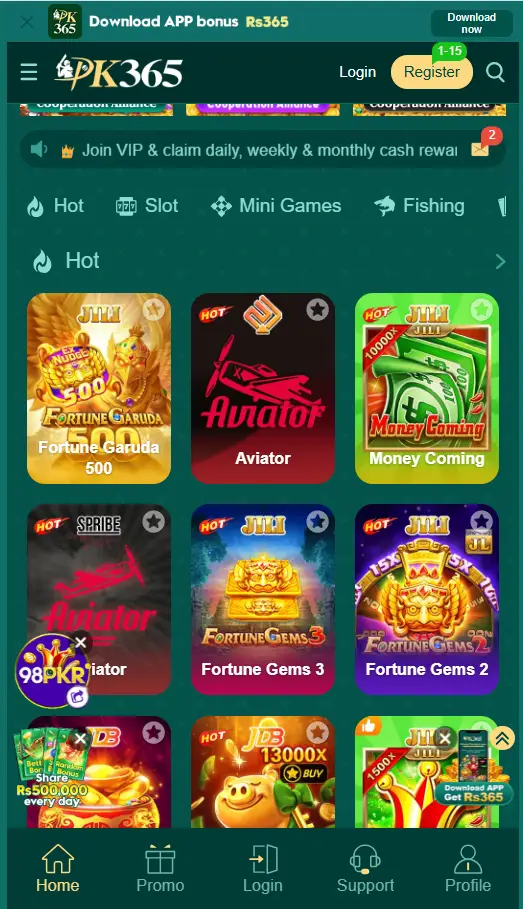
PK365 Game is an all-in-one Android app with tens of millions of popular games to choose from. When you open it, you land on the Home screen, and a simple bottom menu lets you move between the main sections: Home, Promo, Login, Support, and Profile.
The app is built around Pakistani users. It supports local payment services like Easypaisa and JazzCash, uses Rupees (Rs), and offers Urdu-friendly support channels. You can create an account, add funds to your wallet, play across many game types, collect rewards, and withdraw your balance , all inside one app.
Game Categories on PK365 🔥
The Home screen sorts games into clear categories so you can find what you like quickly. The main tabs include Hot, Slot, Mini Games, and Fishing. Popular titles featured in the Hot section include Aviator, Fortune Garuda, and Money Coming. New games are added over time, so the library keeps growing.
Key Features of PK365 Game ⭐
PK365 brings several useful features together in one place: a clean, mobile-first design that is easy to use, a large game library across multiple categories, an in-app wallet that supports Easypaisa, JazzCash, and USDT with instant transactions, a full VIP program with rising rewards, a new player mission system, a referral and agent program, and 24-hour support channels. Each of these is explained in its own section below.
Simple, Easy-to-Use Design 👍
The layout is clean and well organised. The bottom menu keeps Home, Promo, Login, Support, and Profile one tap away, so beginners can find everything without a long learning curve.
In-App Wallet 💳
Your balance, deposits, and withdrawals all sit in one wallet area. Transactions through Easypaisa, JazzCash, and USDT are instant and unlimited, so you are not waiting around.
24-Hour Support 🎧
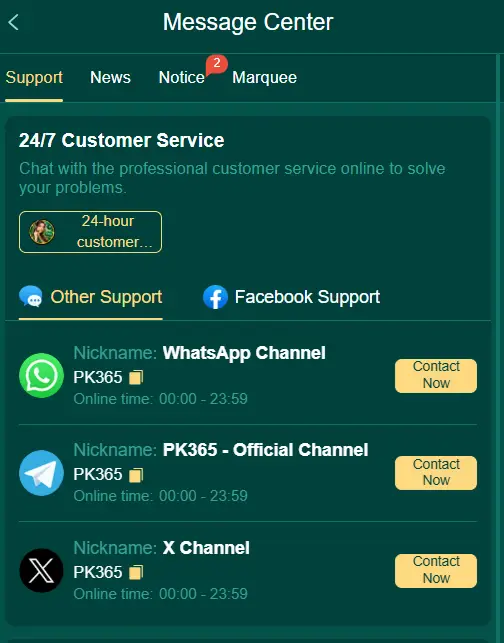
The Support section connects you to official channels, including a WhatsApp Channel, the PK365 Official Telegram Channel, and an X Channel. Online time is listed as 00:00 to 23:59, so help is available throughout the day.
How to Download the PK365 App 📥
Because PK365 is shared directly as an app rather than through the Play Store, the steps are a little different:
- Open the official PK365 website in your phone’s browser.
- Tap the Download option (the app shows a “Download APP” button at the top).
- Let the file download fully before you install it.
- A half-finished download is the most common reason for an install error, so wait for it to complete.

Download App Bonus 🎁
The app highlights a download reward for new users – a Rs 365 welcome gift is shown for downloading the official app and logging in. Always check the current offer on the live screen, as reward amounts can change.
How to Install the App on Android ⚙️
Android blocks apps from outside the Play Store by default, so you allow it once:
- Open Settings on your phone.
- Go to Security (or Apps, then Special access).
- Turn on “Install unknown apps” for the browser you used.
- Open your Downloads folder and tap the PK365 file.
- Tap Install and wait a few seconds.
- You can turn the permission back off afterwards – the app still works.
If it will not install, re-download the file, free up some storage, and make sure your Android version is not very old.
How to Register a PK365 Account 📝
You create your account inside the app on the Register tab. The process is quick:
- Open the app and tap Register.
- Enter your Pakistani phone number (the app defaults to +92), or use email.
- Set a password you can remember easily.
- Confirm to finish.
- Complete the mobile SMS verification when the app asks – this also unlocks a new player reward.
How to Log In to PK365 🔑
The Login screen supports Phone number, Email, or Profile login. You can log in two ways: Password Login or Code Login.
- Open the app and tap Login.
- Enter your phone number, email, or profile.
- Choose Password Login and enter your password, or choose Code Login to log in with a one-time code.
- Tick “Remember account password” if it is your own device.
- Tap Login.
The login screen also has quick options – Face login, Google, and Telegram – plus Customer Service, a Demo option, and Forgot Password if you need to reset.
New Player Missions and Rewards 🎯
PK365 has a Mission section with a “New Player” tab that rewards you for getting started. Based on the app, the new player missions include:
| Mission | Reward |
|---|---|
| Sign up an account | Rs 1 – Rs 15 |
| Mobile SMS verification | Rs 10 – Rs 65 |
| First recharge (log in to the app) | Rs 100 |
There are also follow-on rewards shown in the app: if your play activity reaches Rs 500 in a day, a Rs 200 reward can be available the next day, and a first recharge above Rs 300 can unlock an extra first-recharge reward of up to Rs 88,888. Rewards usually require you to meet an activity requirement before withdrawal, and your account details cannot be changed before your first withdrawal, so set them up correctly from the start. Always check the current mission screen for exact conditions.
PK365 VIP Program 👑
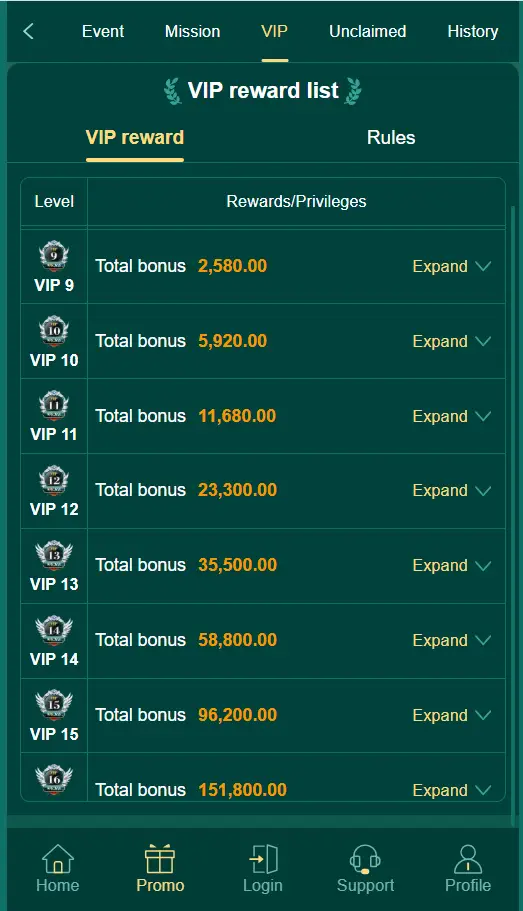
PK365 has a VIP system that runs from VIP 0 up to VIP 9 and beyond. The higher your VIP level, the larger the rewards. The app lists a total bonus for each level:
| VIP Level | Total Bonus |
|---|---|
| VIP 1 | Rs 15 |
| VIP 2 | Rs 30 |
| VIP 3 | Rs 60 |
| VIP 4 | Rs 105 |
| VIP 5 | Rs 165 |
| VIP 6 | Rs 330 |
| VIP 7 | Rs 700 |
| VIP 8 | Rs 1,330 |
| VIP 9 | Rs 2,580 |
VIP 1 also includes a monthly salary and a next-level bonus. VIP members get privileges such as unlimited daily withdrawals and unlimited daily withdrawal times. A level-up bonus of up to Rs 10,000,000 is advertised for the VIP club.
How VIP Rewards Work 📈
Based on the app’s rules: you can reach VIP 1 with one deposit and meeting a play activity requirement, which unlocks a real-time promotion bonus. Daily VIP rewards are available from VIP 3, weekly rewards from VIP 2, and a monthly reward from VIP 1 that is given on the 1st of each month. VIP rewards must be claimed within their validity period, and a one-time play requirement usually applies before withdrawal. Check the live VIP rules for the current conditions.
Monthly Reward Days: 8, 18, 28 🗓️
PK365 runs three reward days each month – on the 8th, 18th, and 28th – with rewards advertised up to Rs 1,000,000, delivered on time. Open the Promo or Event section on those dates to see what is available.
Easypaisa, JazzCash & USDT Payments 💰
PK365 supports three payment options: Easypaisa, JazzCash, and USDT. The app describes these transactions as instant and unlimited, which makes adding and receiving funds fast.
Easypaisa 📲
Easypaisa is one of the most trusted mobile payment services in Pakistan. In the PK365 wallet, choose Easypaisa, follow the on-screen steps, and approve the payment from your own Easypaisa account. Keep your PIN private and only approve a request you started yourself.
JazzCash 📱
JazzCash works the same simple way. Choose JazzCash in the wallet, enter your own number, and approve the request from your JazzCash app. Always double-check the number before you confirm, as a wrong number cannot be reversed.
USDT 🪙
For users who prefer it, PK365 also supports USDT. Follow the exact details shown on the wallet screen when choosing this option.
How to Add Funds (Deposit) ➕
- Open the app and log in.
- Go to the wallet or recharge section.
- Choose your method – Easypaisa, JazzCash, or USDT.
- Enter the amount you want to add.
- Enter your own mobile wallet number.
- Confirm, then approve the payment request on your wallet app.
- Your balance updates instantly. If it does not appear right away, wait a few minutes and refresh.
How to Withdraw Your Balance 🏦
- Open the app and log in.
- Go to the wallet section and tap Withdraw.
- Choose Easypaisa, JazzCash, or USDT.
- Enter the amount and your own wallet number carefully.
- Review the details and confirm.
- Check the status in your History or transaction records.
Note: make sure your account details are correct before your first withdrawal, because the app does not let you change account information before the first withdrawal is completed. VIP members enjoy unlimited daily withdrawals.
Refer Friends & Agent Program 🤝
PK365 has a built-in referral and agent program. You can get Rs 500 for each friend who joins through your link, plus a 3.65% lifetime commission on their activity.
How to Share Your Referral Link 🔗
Go to Profile, then Agent (or tap Referral in the lobby). Copy your invitation link or save your personal QR code, and share it through WhatsApp, Facebook, Telegram, Instagram, or X. When friends register with your link or QR code, they become your subordinates and you start earning commission.
How Commission Works 📊
When a friend you invited takes part the same day, your commission can be credited the next day. You can check your performance level and commission under Promo, then Performance and My Commission.
Payment Problems and Simple Fixes 🛠️
The app’s own Help Center answers the most common payment question — “Recharge successful but money not credited.” Here is that guidance, plus other quick fixes.
| Problem | What to Do |
|---|---|
| Recharge successful but balance not credited | Check your transaction records, wait at least 15 minutes, then contact support with your transaction ID, time, amount, and proof. |
| No payment request received | Check your wallet number is correct and try again. |
| Wrong number entered | Contact customer service right away. |
| Transaction failed | Check your internet and try again. |
| Login not working | Check your details, or use Forgot Password. |
Official PK365 Support Channels 📞
You can reach PK365 through its official channels, listed in the Support section with online time 00:00 to 23:59: a WhatsApp Channel, the PK365 Official Telegram Channel, and an X Channel. There is also Facebook Support and an in-app Help Center where you can search your question.
Tip: the app notes that some addresses can change. If a page will not load, clear your browser cache or switch your network, and always confirm the official address from inside the app.
Keeping Your Account Safe 🔒
Download and update the app only from the official source. Keep your login details and your Easypaisa, JazzCash, or USDT PIN private. Set your account details correctly before your first withdrawal. Use a stable connection when you register or make payments, and only approve payment requests that you started yourself.
Final Thoughts ✅
PK365 Game puts a large game library, Easypaisa/JazzCash/USDT payments, a full VIP program, new player missions, and a referral system into one Android app. Start from the official source, register and verify your number, set your details correctly, and use the live wallet and Promo screens for the current rewards. With those basics done, you are ready to explore everything PK365 offers.
Frequently Asked Questions (FAQ) ❓
Is PK365 Game on the Play Store?
No. PK365 is shared as an official app that you download directly, not through the Google Play Store. It is Android only and not available on iPhone.
What payment methods does PK365 support?
Easypaisa, JazzCash, and USDT. The app describes these as instant and unlimited.
How do I log in to PK365?
Use your phone number, email, or profile, then choose Password Login or Code Login. Quick login with Face, Google, or Telegram is also available.
What rewards can new players get?
New player missions give Rs 1–15 for signing up, Rs 10–65 for SMS verification, and Rs 100 for a first recharge, with further rewards for activity and a first recharge above Rs 300 (up to Rs 88,888). Check the live mission screen for current conditions.
How does the VIP program work?
VIP runs from VIP 0 upward, with larger total bonuses at each level and benefits like unlimited daily withdrawals. You reach VIP 1 with a deposit and meeting the activity requirement.
How much can I get for referrals?
Rs 500 per invited friend, plus a 3.65% lifetime commission. Share your link or QR code from the Agent section in your Profile.
My recharge was successful but the money is not showing. What should I do?
Check your transaction records, wait at least 15 minutes, and if it still has not credited, contact support with your transaction ID, time, amount, and proof of payment.
Can I change my account details before withdrawing?
No. Account information cannot be changed before your first withdrawal, so set your details correctly when you register.