
How to Withdraw from PK365 – Step-by-Step Cash-Out Guide 🏦
Withdrawing from PK365 sends your wallet balance to your own payment account. This guide explains the process in simple steps, what to prepare, and how to check your request , so your cash-out goes smoothly.
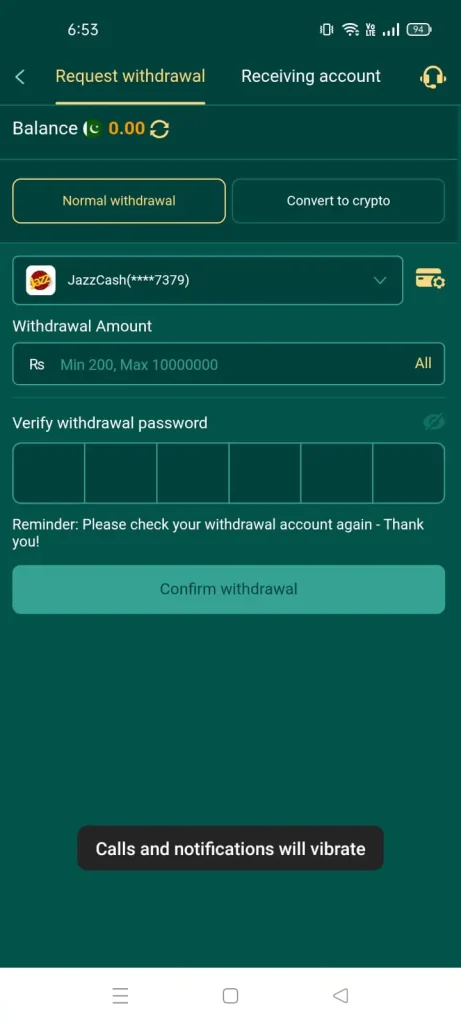
What Is a PK365 Withdrawal? 🎯
A withdrawal is when you move your PK365 wallet balance out to your own Easypaisa or JazzCash account. You need to be logged in with a balance available. If you still need to add funds first, see our PK365 Deposit guide.
Where to Find the Withdrawal Option 📲
Log in and open the wallet area. Within your wallet you will find the Withdraw option. From there you choose your method and enter your details. A support icon and a history icon are available to get help and review past requests.
Withdrawal Methods 💳
PK365 supports the same trusted local payment services used for deposits , Easypaisa and JazzCash. Choose the method you actually use so the funds reach the right account.
Easypaisa 📲
Select Easypaisa and enter your own Easypaisa account details exactly as requested. Make sure the name and number match your account.
JazzCash 📱
Select JazzCash and enter your own JazzCash details carefully. A wrong number cannot be reversed, so check twice before you submit.
What to Check Before You Withdraw ✅
Before submitting, make sure you are logged in, your account details are correct, and you have a balance available. Set your account information correctly from the start, because PK365 does not let you change account details before your first withdrawal is completed. If the app shows any required verification or activity condition, complete it first so your request is not delayed.
How to Withdraw Step by Step 🔢
- Log in and open your wallet.
- Tap the Withdraw option.
- Choose your method — Easypaisa or JazzCash.
- Enter the amount you want to withdraw. Check any minimum or limit shown on the screen.
- Enter your own account details (name and number) carefully.
- Review everything once more.
- Submit your request.
- Check the status in your history.
Minimums, Limits, and Processing Time 📊
Any minimum amount, limit, or fee is shown on the live withdrawal screen, so always read it there before you confirm. VIP members enjoy an added benefit , the VIP section lists unlimited daily withdrawals and unlimited daily withdrawal times, so higher VIP levels have fewer limits. Because exact figures can change with updates, treat the on-screen numbers as the final word.
How to Check Your Withdrawal Status 🕒
After you submit, your request will show a status such as pending, processing, or completed. Use the history icon in your wallet to track it. Wait for the time shown in the app before following up.
If Your Request Is Pending or Rejected ⚠️
If your request stays pending longer than expected, do not resubmit repeatedly — check the status first, then contact support through the app. If a request is rejected, the most common reasons are incorrect account details or an unmet condition, so review your information and the on-screen requirements before trying again.
Common Withdrawal Problems and Fixes 🛠️
| Problem | What to Do |
|---|---|
| Withdraw option not showing | Make sure you are logged in and your balance is loaded. |
| Request stuck on pending | Check the status, wait the stated time, then contact support. |
| Wrong account details entered | Contact customer service right away with your request info. |
| Amount not accepted | Check the minimum or limit shown on the screen. |
| Request rejected | Review your details and any activity condition, then retry. |
| Status not updating | Refresh the history, and check your internet connection. |
Official Support and Keeping Records 📞
Keep a note of your withdrawal request details until the funds arrive. For help, use the support icon in your wallet or the official channels in the Support section (WhatsApp, Telegram, X), online throughout the day.
Frequently Asked Questions (FAQ) ❓
Which methods can I use to withdraw?
PK365 supports local payment services such as Easypaisa and JazzCash. Choose your method on the withdrawal screen.
Is there a minimum withdrawal amount?
Any minimum or limit is shown on the live withdrawal screen, so check it there before submitting.
How long does a withdrawal take?
Processing time is shown in the app and varies. Wait for the stated time before following up.
Can I change my account details before withdrawing?
No. Account information cannot be changed before your first withdrawal, so set it correctly when you register.
Why was my withdrawal rejected?
Usually because of incorrect account details or an unmet condition. Review both and contact support if you are unsure.
Do VIP members get better withdrawal benefits?
Yes. The VIP section lists unlimited daily withdrawals and withdrawal times for VIP members.