
PK365 Login 2026 | How to Sign In to Your PK365 Account
How to Log In to PK365 – Simple Sign-In Guide 🔑
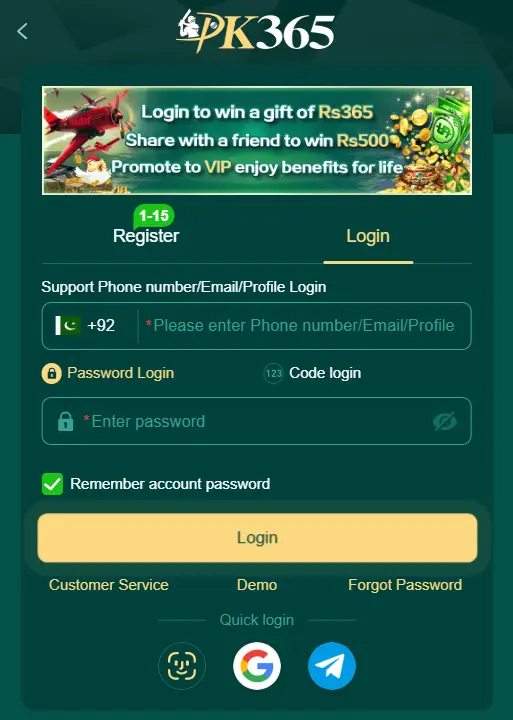
Logging in to PK365 takes only a few seconds once your account is set up. This page explains the real login screen, shows your sign-in options, and helps you sort out a forgotten password or other small issues.
What Is PK365 Login? 🎯
Login is how you enter your own PK365 account. You use the same phone number or email and password you set when you registered. If you do not have an account yet, start with our PK365 Register guide first.
What You Need Before Logging In ✅
To log in you need the phone number, email, or profile you registered with, your password (or access to your phone for a login code), and a working internet connection. That is all.
Where to Find the Login Option 📲
Open the PK365 app or website. On the opening screen you will see a Login tab next to the Register tab. There is also a Login button in the bottom menu bar. Tap either one to open the login form.
How to Log In Step by Step 🔢
- Open the app and tap Login.
- In the top field, enter your Phone number, Email, or Profile. The phone field shows +92 for Pakistan.
- Choose your method: Password Login or Code login.
- For Password Login, type your password. You can tap the eye icon to show or hide it.
- For Code login, tap to receive a one-time code on your phone and enter it.
- Tick Remember account password if it is your own device.
- Tap the Login button.
Quick Login Options 🔗
Under the Login button you will see Quick login icons: Face login, Google, and Telegram. If you set these up, you can sign in with one tap instead of typing your details.
Forgot Your Password? 🔓
If you cannot remember your password, tap Forgot Password on the login screen and follow the steps shown to reset it. The screen also has a Customer Service link if you need help, and a Demo option if you just want to look around.
Common Login Problems and Fixes 🛠️
| Problem | What to Do |
|---|---|
| Wrong password error | Re-type carefully, or use Forgot Password to reset. |
| Login code not arriving | Check your number and internet, then request the code again. |
| Login page won’t open | Clear your browser cache or switch your network, then retry. |
| Account not recognised | Make sure you are using the same number/email you registered with. |
| App frozen on login | Close the app fully and open it again. |
Account Safety Tips 🔒
Only log in on the official app or website. Use Remember account password only on your own phone, keep your password private, and never share a login code with anyone – not even someone claiming to be support.
FAQ❓
Can I log in with my email?
Yes. PK365 supports login with your phone number, email, or profile.
What if I forget my password?
Use the Forgot Password option on the login screen to reset it.
Is it safe to log in with my phone number?
Yes. The login step and code verification are there to protect your account.
Can I stay logged in?
Yes. Tick Remember account password, but only do this on your own trusted device.
Can I log in without the app?
You can use the official website, but most users prefer the app for a smoother experience.